Pick any color on screen. Paste it as code.
Press ⌃⌥C in any app and a loupe appears under your cursor. Click a pixel and its color is on your clipboard, as HEX, OKLCH, SwiftUI, Tailwind or whichever format you work in. Recent colors and your palettes wait in the menu bar.
macOS 14 or later. Apple silicon and Intel. Your colors stay on your Mac.
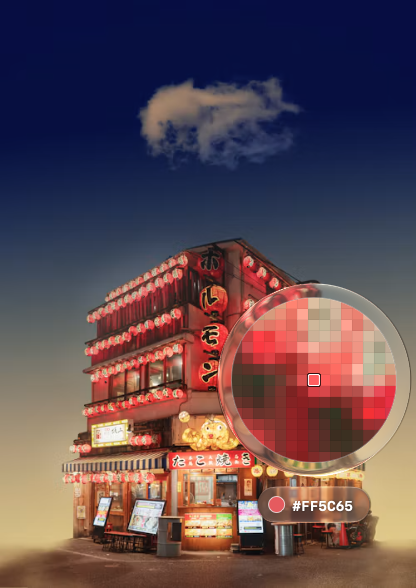
One shortcut, any pixel
⌃⌥C freezes the screen and shows a loupe with a 15 × 15 pixel zoom and the live value under it. Arrow keys move one pixel, Shift and an arrow move ten. Click, Return or Space picks; Esc or a right-click cancels. It works on every display and over full-screen apps.
Copied in your format
HEX, rgb(), hsl(), oklch(), SwiftUI Color in sRGB or Display P3, NSColor, UIColor, a CSS variable or the nearest Tailwind v4 class. Choose a default and every pick is copied that way. The loupe's pill shows what went to the clipboard.
Real Display P3 values
SupaPick reads the pixel in your display's own color space. On a wide-gamut screen the Display P3 value is the real one, not the sRGB value with a new label.
History in the menu bar
Your last 20 picks sit in the menu with a swatch. Hover one to see it in every format and click the one you need.
Palettes that export to code
Pin colors to Favorites or a palette of your own, rename them, then export as a Swift extension, CSS variables or a Tailwind v4 theme. Copy it or save a file.
Contrast, WCAG 2 and APCA
Choose Contrast… in the menu and compare two of your recent colors. You get the WCAG ratio, the APCA Lc value and pass or fail for AA, AA Large, AAA and AAA Large. Swap text and background with one click.
How it works.
- Open SupaPick once and allow Screen Recording. macOS asks for it before an app can capture the screen, and SupaPick's loupe works from a capture. SupaPick asks for it only during setup.
- Press ⌃⌥C in any app, or choose Pick Color from the eyedropper in the menu bar.
- Move the loupe to the pixel you want. Use the arrow keys for the last few pixels.
- Click. The pill says “copied”, the loupe closes, and you are back in your app with the value on the clipboard.
Free to pick. $4.99 for the rest.
Everything is unlocked for 7 days. After that the loupe and HEX stay free for good, and a license adds the rest.
| Free, after the trial | Licensed | |
|---|---|---|
| Loupe and shortcut | Yes | Yes |
| Copy as HEX | Yes | Yes |
| History of the last 20 colors | In HEX | In every format |
| rgb(), hsl(), oklch(), SwiftUI, NSColor, UIColor, CSS variable, Tailwind | No | Yes |
| Palettes and export to Swift, CSS and Tailwind | No | Yes |
| Contrast panel | No | Yes |
When the trial ends, your history and palettes are kept. Locked items show a lock in the menu.
One app, a pair, or everything.

SupaPick
One license for three Macs, and every 1.x update included.
+1Pair it with one more
SupaPick plus one other Supa app. Two keys, one checkout.
Everything
SupaClip, SupaGrab, SupaNext, SupaJot and SupaPick. Five keys, one checkout, three Macs each.
- Your keys arrive by email seconds after checkout.
- Tax is included at checkout and you get an invoice.
- After the trial, the loupe, HEX copy and HEX history keep working for free.
Secure checkout with Stripe. Cards, Apple Pay and Link.
Questions and answers.
Why does it need Screen Recording permission?
macOS asks for it before an app can capture the screen, and SupaPick's loupe works from a capture. SupaPick asks once, during setup. When you press the shortcut it takes one still image of your displays, reads colors from it in memory, and lets it go when the loupe closes. No screenshots are saved and nothing is uploaded.
Are the Display P3 values real?
Yes. SupaPick reads each pixel in your display's own color space and converts it to both sRGB and Display P3. The SwiftUI Color (Display P3) format uses the P3 value. HEX, rgb(), hsl(), oklch() and the other code formats use sRGB, and a color outside sRGB is clipped to its edge.
How does it pick the Tailwind class?
It finds the closest color in Tailwind v4's default palette, measured in OKLab. When the match isn't exact, the menu and the loupe show it as sky-600 ≈, and the copy is the plain class name, sky-600.
Where are my colors stored?
History and palettes are one file, library.json, in ~/Library/Application Support/SupaPick on your Mac. History keeps your last 20 picks. There is no account. SupaPick goes online only to check for updates and to activate a license key.
Does it work with full-screen apps and a second display?
Yes. The loupe opens on the display under your cursor, the other displays join a moment later, and you can move between them while you pick. It also opens over full-screen apps.
Can I change ⌃⌥C?
Yes, in Settings → General. If another app already uses the combination you choose, SupaPick says so and keeps the old one. You can always pick from the menu bar with Pick Color.
How does the trial work?
Everything is unlocked for 7 days, no account needed. After that the loupe, HEX copy and HEX history keep working for free. The other formats, palettes with export and the contrast panel need a license key. Your history and palettes are kept either way.
Can I get a refund?
Yes. Write to support@supatools.app within 14 days of buying and you'll get your money back.
Which Macs does it run on?
Any Mac on macOS 14 Sonoma or later, Apple silicon or Intel. On macOS 26 and later the loupe uses Liquid Glass; before that it uses a blur.